# User Guide

* First, connect your wallet.

<figure><img src="https://2949540665-files.gitbook.io/~/files/v0/b/gitbook-x-prod.appspot.com/o/spaces%2FtTyUuBQOOKLnlfglEPqD%2Fuploads%2FfoDzHM9l2lkSsjOrSbO0%2Fimage.png?alt=media&#x26;token=688a7024-7927-4ee1-9cb0-8c53fa2d7e49" alt="" width="375"><figcaption></figcaption></figure>

* Transfer USDT and a small amount of ETH from your decentralized wallet to your special Account Abstraction (AA) Vault.
* USDT is our accepted options premiums currency.
* ETH will be used as gas.

<figure><img src="https://2949540665-files.gitbook.io/~/files/v0/b/gitbook-x-prod.appspot.com/o/spaces%2FtTyUuBQOOKLnlfglEPqD%2Fuploads%2Fq44i3BA5WPxRoAIFFgfE%2Fimage.png?alt=media&#x26;token=6371906f-4dac-4bde-a5b3-d5c5847a8eb6" alt="" width="375"><figcaption></figcaption></figure>

* Your AA Vault will enable you to trade options in a peer-to-peer manner, ensuring zero counterparty risk.

<figure><img src="https://2949540665-files.gitbook.io/~/files/v0/b/gitbook-x-prod.appspot.com/o/spaces%2FtTyUuBQOOKLnlfglEPqD%2Fuploads%2FF9vyXHRTztedlF578lcE%2Fimage.png?alt=media&#x26;token=e8ef6be8-0b01-4de7-8ba0-9cc621248f1d" alt="" width="375"><figcaption></figcaption></figure>

* Once you see this, you are now ready to buy options using USDT as premiums.

<figure><img src="https://2949540665-files.gitbook.io/~/files/v0/b/gitbook-x-prod.appspot.com/o/spaces%2FtTyUuBQOOKLnlfglEPqD%2Fuploads%2Foe7qTdcm9Ez7S6O1DDrt%2Fimage.png?alt=media&#x26;token=f56d3541-861e-4e29-a7b8-9ef59319d955" alt="" width="375"><figcaption></figcaption></figure>

* Next, back in this main page, click on the topmost dropdown button to reveal the Select Options page.

<figure><img src="https://2949540665-files.gitbook.io/~/files/v0/b/gitbook-x-prod.appspot.com/o/spaces%2FtTyUuBQOOKLnlfglEPqD%2Fuploads%2F9PpI5FnZzj245Qjb0gZv%2Fimage.png?alt=media&#x26;token=3d711d04-5ab8-4030-9855-b7e0a0103b46" alt="" width="375"><figcaption></figcaption></figure>

Here, you can select:

* The token you’d like to make a price prediction on (ETH, WBTC, ARB, etc.),and the duration of your trade (2H, 4H, 8H, 12H, 24H)

<figure><img src="https://2949540665-files.gitbook.io/~/files/v0/b/gitbook-x-prod.appspot.com/o/spaces%2FtTyUuBQOOKLnlfglEPqD%2Fuploads%2FlXttKahnGVigkCUmzhgI%2Fimage.png?alt=media&#x26;token=52c21656-4290-4e6c-ba5b-76f2e61c3e1b" alt="" width="375"><figcaption></figcaption></figure>

* Expanding on the next banner will reveal a Trading View price chart.

<figure><img src="https://2949540665-files.gitbook.io/~/files/v0/b/gitbook-x-prod.appspot.com/o/spaces%2FtTyUuBQOOKLnlfglEPqD%2Fuploads%2FMTYDQdOAYVYd2ImUUDcy%2Fimage.png?alt=media&#x26;token=2d8b3c22-ee3e-4487-8fcc-7ba5f6dcaf57" alt="" width="375"><figcaption></figcaption></figure>

* This Trading View integrated price chart will help you make an informed prediction on your trade.

<figure><img src="https://2949540665-files.gitbook.io/~/files/v0/b/gitbook-x-prod.appspot.com/o/spaces%2FtTyUuBQOOKLnlfglEPqD%2Fuploads%2FjPTXla40kna5Sz0aZZHy%2Fimage.png?alt=media&#x26;token=1c2f866a-c36b-4e25-955b-7f896afb5eb9" alt="" width="375"><figcaption></figcaption></figure>

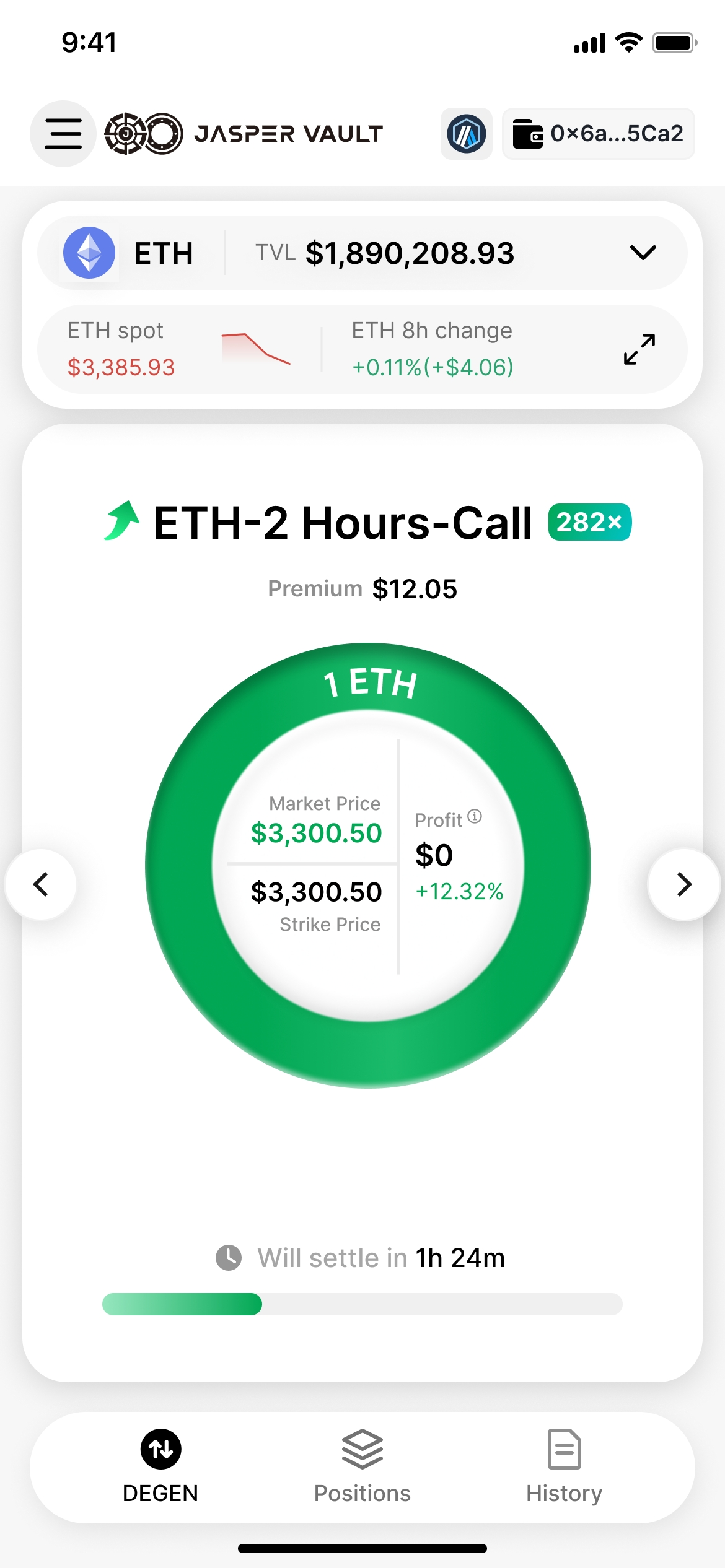
Now, the final few steps to enjoy effortless leverage trading:

1. Select your preferred exposure to the underlying (0.1, 1 or 2 ETH in this example).
2. Confirm the premium you will pay.
3. Place a <mark style="color:green;">**Long Call**</mark> to bet that ETH will go up from current price.
4. Place a <mark style="color:red;">**Long Put**</mark> to bet that ETH will go down.

<figure><img src="https://2949540665-files.gitbook.io/~/files/v0/b/gitbook-x-prod.appspot.com/o/spaces%2FtTyUuBQOOKLnlfglEPqD%2Fuploads%2FizV4gC8QkOUODtcfQNQZ%2Fimage.png?alt=media&#x26;token=557d8e3a-e88b-48cd-b662-b5bf96d878ec" alt="" width="375"><figcaption></figcaption></figure>

* You will now be prompted with a few signatures to enable your peer-to-peer trade.

<figure><img src="https://2949540665-files.gitbook.io/~/files/v0/b/gitbook-x-prod.appspot.com/o/spaces%2FtTyUuBQOOKLnlfglEPqD%2Fuploads%2FfvqGpXWxfcJE30g5mOGF%2Fimage.png?alt=media&#x26;token=9e0a5d09-a05a-4b28-9b8c-02b98f27cc25" alt="" width="375"><figcaption></figcaption></figure>

* Congratulation, you have now placed your Degen Options trade!

<figure><img src="https://2949540665-files.gitbook.io/~/files/v0/b/gitbook-x-prod.appspot.com/o/spaces%2FtTyUuBQOOKLnlfglEPqD%2Fuploads%2F2h6jM3X5a0viwLoKgvO7%2Fimage.png?alt=media&#x26;token=25f4f861-022e-42b5-96a9-f24eb85affde" alt="" width="375"><figcaption></figcaption></figure>

* You can now view your live trade’s profitability like this.

<figure><img src="https://2949540665-files.gitbook.io/~/files/v0/b/gitbook-x-prod.appspot.com/o/spaces%2FtTyUuBQOOKLnlfglEPqD%2Fuploads%2FFMuTZyhJjJO4tiZfcKzd%2Fimage.png?alt=media&#x26;token=86fe98ce-012b-4abe-b611-7485f614f0b8" alt="" width="375"><figcaption></figcaption></figure>

* Navigating to your Positions Tab, you can also view your multiple live positions like this.

<figure><img src="https://2949540665-files.gitbook.io/~/files/v0/b/gitbook-x-prod.appspot.com/o/spaces%2FtTyUuBQOOKLnlfglEPqD%2Fuploads%2Fv15WGTd1oAdyLNlplPwr%2Fimage.png?alt=media&#x26;token=e18cc358-4e00-412a-8746-a464761beb30" alt="" width="375"><figcaption></figcaption></figure>

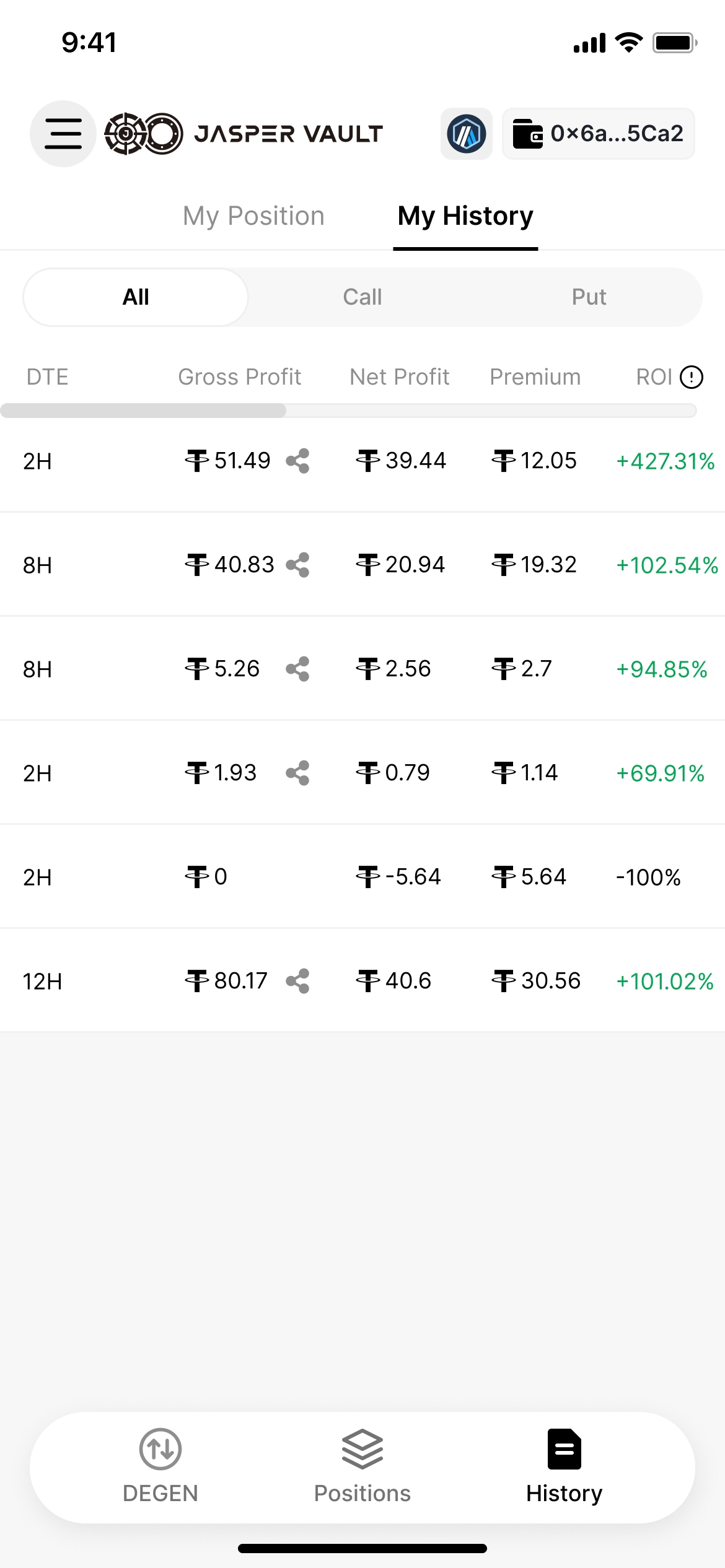
* Navigating to your History Tab, you can view your past positions and all relevant statistics.

<figure><img src="https://2949540665-files.gitbook.io/~/files/v0/b/gitbook-x-prod.appspot.com/o/spaces%2FtTyUuBQOOKLnlfglEPqD%2Fuploads%2FLn5tT2VQhuhnc1FfbfQM%2Fimage.png?alt=media&#x26;token=6cfc60ff-7541-4e8d-a4ec-ff7e1187ebb8" alt="" width="375"><figcaption></figcaption></figure>

* If you click on the share icon next to Gross Profit, you will be able to see a PnL screenshot of your past trades and share it on your socials.

<figure><img src="https://2949540665-files.gitbook.io/~/files/v0/b/gitbook-x-prod.appspot.com/o/spaces%2FtTyUuBQOOKLnlfglEPqD%2Fuploads%2FJxJ5ie8PhphUGoqYc8FS%2Fimage.png?alt=media&#x26;token=bc72688d-fdd8-40d4-b741-1ed4126d3a7c" alt="" width="375"><figcaption></figcaption></figure>