> For the complete documentation index, see [llms.txt](https://docs.jaspervault.io/llms.txt). Markdown versions of documentation pages are available by appending `.md` to page URLs; this page is available as [Markdown](https://docs.jaspervault.io/development/architecture/trade-settlement.md).
# Trade Settlement
In Jasper Vault, options trading settlement involves three scenarios for settling funds and profits: Cash Exercise, Asset Exercise, and Not Exercising.
1. Cash Exercise
When the current price exceeds the strike price, buyers can choose cash exercise settlement. The relayer monitors EVM transactions and submits the transaction logs to Jasper Nodes. Jasper Nodes verify these logs and sign the BTC unlock transaction using PSBT. The relayer then monitors the Jasper signatures and submits the unlock BTC signature on the Bitcoin blockchain. The profit is sent to the buyers, and the remaining BTC is returned to the sellers.
2. Asset Exercise
When the current price exceeds the strike price, buyers can choose asset exercise settlement. Unlike cash exercise, asset exercise requires buyers to pay USDT for BTC. The relayer monitors EVM transactions and submits the transaction logs to Jasper Nodes. Jasper Nodes verify these logs and sign the BTC unlock transaction using PSBT. The relayer then monitors the Jasper signatures and submits the unlock BTC signature on the Bitcoin blockchain. The BTC is then sent to the buyers.
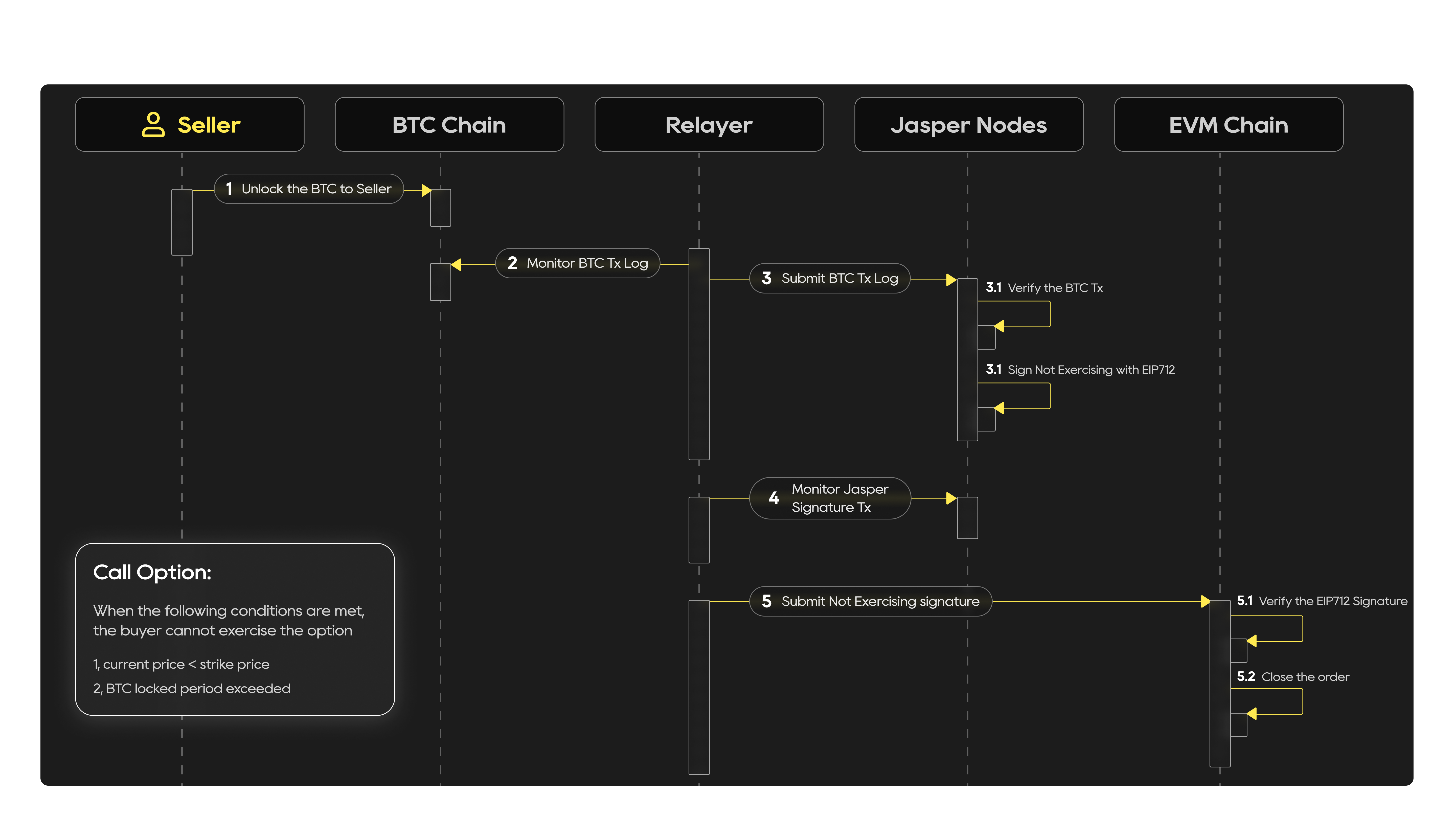
3. Not Exercising
When the current price is below the strike price and the BTC lock period has expired, the sellers' BTC will be unlocked. The relayer monitors the Bitcoin transaction logs. Jasper Nodes verify the BTC transactions and sign the non-exercising BTC using EIP-712 when the relayer submits the BTC transaction logs and monitors the Jasper signature transactions. The relayer then submits the non-exercising signature to the EVM chain, where it is verified to close the order.